The Threat of Unauthorized SIMs in Pakistan: Why Immediate Action is Critical
In Pakistan's modern digital landscape, discovering that an unauthorized mobile SIM card is active under your Computerized National Identity Card (CNIC) is a serious legal emergency. Telecommunication identity in Pakistan is biometrically bound to your national citizen profile through the Pakistan Telecommunication Authority (PTA) and the National Database and Registration Authority (NADRA).
Under the statutory framework of the Prevention of Electronic Crimes Act (PECA 2016) and the Pakistan Telecommunication (Re-organization) Act 1996, the individual whose thumbprint is recorded against a cellular line is held legally accountable for all communications, text messages, financial transactions, and digital engagements conducted through that SIM. If a rogue individual, financial scammer, or criminal syndicate operates a connection registered under your identity, law enforcement agencies—including local police departments and the Federal Investigation Agency (FIA) Cyber Crime Wing—will initiate criminal investigations directly against you. Promptly identifying, disowning, and permanently deactivating any unauthorized connection is the only method to defend your legal integrity and personal liberty.
Urgent Legal Notice: If an unauthorized SIM registered under your CNIC has been utilized in financial extortion, kidnapping ransoms, terrorism financing, or fraudulent lottery schemes, you are at risk of immediate arrest as the registered subscriber. Executing the formal biometric disowning procedure and obtaining a stamped complaint tracking receipt is your primary legal defense.
How Fraudulent & Ghost SIMs Are Generated Under Innocent Identities
Many law-abiding citizens wonder: "How could an unauthorized SIM be active under my CNIC when biometric thumbprint verification is mandatory in Pakistan?"
Despite stringent NADRA BVS controls, unscrupulous retailers and black-market syndicates exploit several systemic vulnerabilities:
- Retailer Double-Scanning Fraud: The most common vector occurs at unauthorized roadside mobile kiosks or third-party retail shops. When an unsuspecting citizen purchases a legitimate SIM card or replaces a lost chip, the dishonest agent falsely states: "The biometric scanner failed, please place your finger again." In reality, the first scan completed the customer's intended purchase, while the second scan was covertly diverted to activate an unauthorized second SIM card.
- Exploitation during Social Welfare Disbursements: During cash distributions for humanitarian or social welfare programs, fraudulent agents have occasionally deceived uneducated beneficiaries into placing multiple thumb impressions on handheld biometric terminals, creating pre-activated SIMs for black-market resale.
- Misuse of High-Resolution CNIC Photocopies: While modern activation requires live physical thumbprints, past regulatory loopholes and rogue employee collusion have allowed black-market operators to synthesize silicone fingerprint casts or forge documents from discarded paper identity photocopies.
- Corporate Account Divergence: Rogue sales executives working on telecom corporate sales targets have historically bundled consumer CNIC credentials into enterprise group plans without explicit subscriber knowledge.
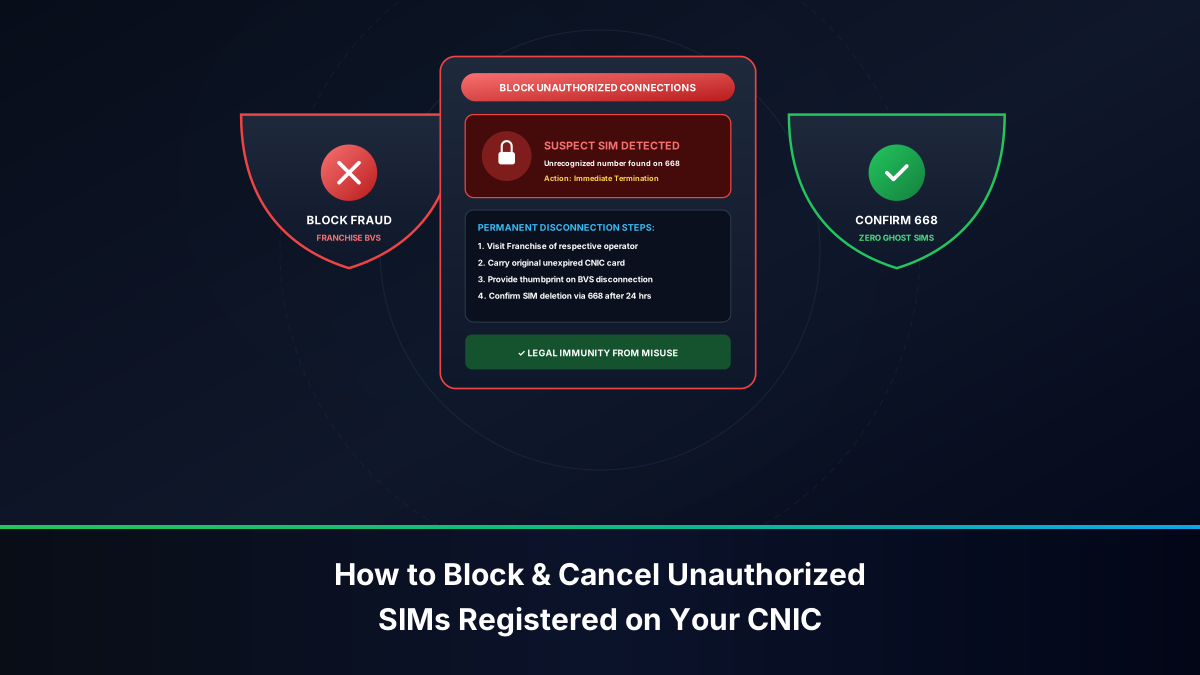
Step 1: Detecting Unauthorized Connections via the PTA 668 Audit
The first step in neutralizing identity fraud is establishing an accurate baseline of your registered cellular connections through the PTA 668 SIM Information System:
- Via SMS Shortcode 668: Send your 13-digit CNIC number without hyphens or spaces (e.g.,
3520112345671) to shortcode 668 from any active mobile phone. (Standard fee: ~PKR 2.00 + tax). - Via Official Web Gateway: Navigate to https://cnic.sims.pk from any computer or smartphone browser. Input your 13-digit CNIC, solve the reCAPTCHA security challenge, and click "Submit" for a completely free audit report.
- Audit the Results Table: Carefully examine the operator-by-operator itemisation. Cross-reference the numbers against the physical SIM cards in your possession:
- If 668 indicates Jazz: 3, but you only own and use 1 Jazz SIM, there are 2 unauthorized Jazz lines active in your name.
- If 668 displays connections under an operator you have never used (for instance, Zong: 1 when you have never been a Zong customer), that connection is 100% fraudulent.
Step 2: The Official Franchise Visit & Biometric Disowning Checklist
Neither the 668 SMS service nor the web portal displays the specific 11-digit phone numbers of unauthorized lines. To obtain the full numbers and permanently terminate them, you must execute a physical customer center visit:
Mandatory Documentation for Franchise Disowning
- Original Physical Smart CNIC / NICOP: You must present your original plastic national identity card. Laminated photocopies, digital photographs on a smartphone, or photocopied slips will be summarily rejected by customer service staff.
- Printed 668 Report: While not legally mandatory, carrying a printout or screenshot of your 668 inquiry accelerates the franchise intake process.
- Active Contact Number: Provide a verified mobile number registered in your name where customer service ticketing updates and cancellation confirmations can be transmitted.
Executing the BVS Biometric Disowning Transaction
- Locate an Official Company Customer Center: Do not visit a neighborhood mobile retailer, corner franchise, or franchise sub-agent. Proceed directly to a primary, company-operated Customer Service Center (CSC) or regional flagship franchise of the relevant operator.
- Request a Complete Subscriber Printout: Inform the service representative: "I require a complete BVS-verified subscriber printout of all MSISDNs active on my CNIC." Place your index finger or thumb upon the NADRA-linked BVS terminal to authenticate your identity.
- Identify the Unrecognized Numbers: Examine the printed list displaying all mobile numbers, activation dates, and issuing dealer codes. Highlight the specific 11-digit numbers that you do not recognize or own.
- Demand Biometric Disowning & De-allocation: Instruct the representative: "I want to formally execute a Biometric Disowning and Immediate Permanent Cancellation of these unrecognized lines."
- Sign the Official Disconnection Form: Complete and sign the operator's standard SIM disconnection agreement. The representative will mandate a final live biometric thumbprint scan to bind your legal cancellation instruction into the telecom clearinghouse.
- Demand Stamped Confirmation: Insist on receiving an official, signed, and stamped customer service receipt bearing the company seal, the date, the disowned MSISDNs, and a formal complaint tracking reference number. Retain this physical document permanently in your legal records.
Step 3: Emergency Helpline Escalation by Network Operator
If you discover that an unauthorized SIM is actively engaged in ongoing harassment or financial fraud outside of normal franchise operating hours, contact the relevant operator's emergency customer helpline immediately to request an urgent provisional suspension:
Jazz & Warid Unauthorized Connection Blocking
- Helpline from Jazz Number: Dial 111.
- From Other Networks / Landline: Dial 042-111-300-300.
- Emergency Protocol: Request the fraud management desk. State that an unauthorized number has been identified on your CNIC and demand an immediate provisional outgoing and incoming call barring pending your franchise visit.
- Corporate Office: Pakistan Mobile Communications Limited, 1-A, IBC-1, Kohistan Road, F-8 Markaz, Islamabad.
Zong 4G Unauthorized Connection Blocking
- Helpline from Zong Number: Dial 310.
- From Other Networks / Landline: Dial 051-111-222-111.
- Emergency Protocol: Select the regulatory compliance option and report fraudulent SIM issuance. Note down the CSR representative ID and complaint ticket number.
- Corporate Office: CMPak Complex, Plot No. 47, Kuri Road, National Park Road, Chak Shahzad, Islamabad.
Telenor Pakistan Unauthorized Connection Blocking
- Helpline from Telenor Number: Dial 345.
- From Other Networks / Landline: Dial 042-111-345-100.
- Emergency Protocol: Request immediate suspension of the unauthorized connection under PTA Consumer Protection Regulations.
- Corporate Office: 345 Telenor Campus, Plot No. 55, River View Avenue, Block B, Gulberg Greens, Islamabad.
Ufone 4G Unauthorized Connection Blocking
- Helpline from Ufone Number: Dial 333.
- From Other Networks / Landline: Dial 033-111-333-100.
- Emergency Protocol: Inform customer support that an unrecognized connection appears on your CNIC and request immediate network barring.
- Corporate Office: Ufone Tower, Jinnah Avenue, Blue Area, Islamabad.
Step 4: Lodging a Regulatory Grievance with the PTA CMS Portal
If an operator's franchise refuses to provide a subscriber printout, declines to process your disowning request, or fails to deactivate the unauthorized line within 72 hours, escalate the matter directly to the national telecom regulator:
- Access PTA CMS Portal: Navigate to https://complaint.pta.gov.pk.
- Create Consumer Profile: Register using your full name, CNIC number, email address, and active mobile number.
- Select Complaint Category: Under complaint type, choose "SIM Related Issues", then select sub-category "Unauthorized SIM Registration / Disowning Failure".
- Detail the Franchise Negligence: Specify the telecom operator, exact franchise branch address, date of visit, and customer service representative name (if known). Attach a photograph of your original CNIC and a screenshot of your 668 audit.
- Submit & Track: Click submit to generate an official PTA CMS Complaint Tracking ID. Under PTA consumer regulations, the operator is legally compelled to resolve regulatory grievances within 5 business days or face statutory administrative fines.
- PTA Consumer Protection Toll-Free Hotline: For urgent telephone assistance, call 0800-55055 (Monday to Friday, 09:00 AM to 05:00 PM).
Step 5: Filing Criminal Reports with FIA Cyber Crime Wing (1991 / NR3C)
If you have reason to believe that the unauthorized SIM card on your CNIC has already been utilized in criminal offenses—such as financial extortion, banking scams, impersonation of government officials, or online harassment—you must immediately establish a formal law enforcement record:
- File an Online Cyber Crime Complaint: Access the official FIA National Response Centre for Cyber Crime (NR3C) portal at https://complaint.fia.gov.pk.
- FIA 24/7 National Emergency Helpline: Dial 1991 immediately from any telephone to speak directly with an FIA cybercrime investigation intake officer.
- Physical Attendance at Regional FIA Cyber Crime Reporting Center: Locate the nearest FIA Cyber Crime Reporting Center in your provincial capital or division (e.g., Islamabad, Lahore, Karachi, Peshawar, Quetta, Multan, Faisalabad, Sukkur). Submit a written statement detailing that an unauthorized SIM was fraudulently issued in your name without your knowledge or consent.
- Obtain the FIA Complaint Receipt: Always obtain a verified diary number or complaint acknowledgment slip. This document serves as your definitive legal protection in the event that the rogue SIM is flagged during subsequent criminal investigations.
Step 6: Auditing Linked Financial Wallets & Credit Bureaus (eCIB)
Criminals who generate ghost SIMs frequently use them to open branchless banking wallets to channel illicit transactions. Immediately following your SIM disowning, audit all major financial services:
- JazzCash Audit: Contact the JazzCash fraud hotline at 4444 (from Jazz) or 021-111-124-444. Verify whether any mobile wallet account exists under your CNIC other than your personal account. Request the immediate freezing of unauthorized accounts.
- EasyPaisa Audit: Contact the EasyPaisa helpline at 3737 (from Telenor) or 042-111-003-737 to audit registered wallet accounts.
- SadaPay & NayaPay Inquiries: Contact in-app support or helplines for SadaPay and NayaPay to verify that no digital debit cards or wallets have been authorized against your identity.
- State Bank eCIB Inspection: Request an annual Electronic Credit Information Bureau (eCIB) report through your commercial bank to confirm that no unauthorized consumer loans, credit facilities, or nano-loans have been disbursed against your CNIC.
Comprehensive Action Plan & Resolution Timeline Matrix
The following workflow summarizes the emergency escalation sequence and regulatory resolution windows:
| Escalation Stage | Responsible Entity | Primary Action Required | Expected Resolution Time | Documentation to Retain |
|---|---|---|---|---|
| 1. Detection | Subscriber | Query 668 via SMS or Web | Instantaneous | Screenshot of 668 Report |
| 2. Emergency Bar | Operator Helpline | Call 111 / 310 / 345 / 333 | 15 to 30 Minutes | Helpline CSR Ticket Number |
| 3. Disowning | Official Franchise | Live BVS Thumbprint Scan | Immediate switch deactivation | Stamped Disowning Receipt |
| 4. Database Sync | PTA 668 Clearinghouse | Batch database reconciliation | 24 to 72 Hours | Updated 668 clean audit |
| 5. Regulatory Escalation | PTA CMS (complaint.pta.gov.pk) | Formal consumer grievance | 3 to 5 Business Days | PTA CMS Tracking Code |
| 6. Criminal Defense | FIA NR3C (Helpline 1991) | Cybercrime fraud reporting | Immediate diary entry | FIA Complaint Diary Number |
Proactive Identity Defense: Preventing Future Unauthorized Activations
Once you have successfully purged unauthorized connections from your CNIC, implement these permanent identity protection habits:
- Watermark All Paper Identity Photocopies: Never hand over an un-annotated paper photocopy of your CNIC to anyone. Draw two bold diagonal blue lines across the copy and clearly write: "For [Purpose] Only - Unauthorized for SIM Registration".
- Refuse Multiple Fingerprint Scans: When purchasing a new SIM or replacing a damaged card, never allow an agent to capture your thumbprint twice without inspecting their terminal screen. If the retailer claims the transaction failed, demand that they show you the system error prompt before providing a second scan.
- Purchase SIMs Only from Official Centers: Avoid purchasing connections from street vendors, umbrella stalls, or unbranded accessory shops. Conduct all telecom transactions at official company-operated Customer Service Centers.
- Schedule Monthly Audits: Set a recurring reminder on your mobile calendar to check 668 on the first of every month. Early detection of ghost connections eliminates legal exposure before criminals can exploit your name.