Few consumer experiences in Pakistan are as frustrating as walking into a mobile franchise—eager to purchase a new SIM card, replace a lost micro-SIM, or complete a critical ownership transfer—only to have the retail agent repeatedly state: "Sir, aapka biometric match nahi ho raha" (Sir, your biometric verification has failed). In a country where cellular subscriptions, mobile banking wallets (Easypaisa, JazzCash, SadaPay, NayaPay), and e-government portals are legally bound to biological identity, a failed biometric verification can bring daily personal and professional transactions to a complete standstill.
Since 2015, following the implementation of the National Action Plan and the mandate of the Pakistan Telecommunication Authority (PTA), paper-based cellular activations have been completely banned. Every single SIM transaction must pass real-time biological authentication through the National Database and Registration Authority (NADRA) Biometric Verification System (BVS). While this framework has virtually eliminated untraceable ghost SIM cards across Pakistan, millions of citizens—particularly senior citizens, agricultural laborers, construction workers, and individuals with dermatological conditions—regularly encounter agonizing fingerprint mismatch errors.
This comprehensive technical guide unpacks the mechanics behind NADRA's BVS architecture, diagnoses the physical, environmental, and system causes of biometric rejections, outlines immediate retail-counter remedies, explains official senior-citizen exemption pathways, and guides you through permanent biometric remediation at NADRA centers.
How NADRA's Biometric Verification System (BVS) Works with Telecom Carriers
To solve biometric failures, it is helpful to understand the underlying technology connecting retail telecom terminals to Pakistan's national data warehouse. The verification workflow does not store your fingerprint on the local shopkeeper's phone or desktop computer; instead, it operates as a distributed cryptographic verification pipeline:
- Hardware Capture: You place your finger (typically your right or left index finger or thumb) on a certified optical or capacitive biometric scanner connected to the operator's retail terminal.
- Minutiae Extraction: The scanner's software extracts specific mathematical landmarks from your dermal ridge patterns—specifically ridge endings (where a fingerprint ridge terminates abruptly) and bifurcations (where a ridge splits into two branches). It compiles these landmarks into an encrypted mathematical file known as a Minutiae Template.
- API Handshake: The telecom operator's billing platform bundles this minutiae template with your 13-digit CNIC number and transmits it over an encrypted private APN (Access Point Name) tunnel to NADRA's Centralized Biometric Verification System (CBVS).
- Algorithmic Comparison: NADRA's high-speed Automated Fingerprint Identification System (AFIS) retrieves the reference biometric template recorded when your CNIC was last issued or renewed. The system calculates a similarity score.
- Pass / Fail Verdict: If the mathematical match confidence exceeds NADRA's statutory threshold (historically calibrated around 70% matching confidence), NADRA returns a success token, and the carrier issues the SIM. If the match falls below the threshold, the gateway returns a failure error code (e.g., "Fingerprint Mismatch" or "Quality Score Insufficient").
Crucially, the franchise agent has no visual access to your reference prints and cannot manually approve a transaction. If NADRA's server says no, the telecom system automatically aborts the workflow.
Root Causes of Biometric Failures: Physical, Biological, & Systemic
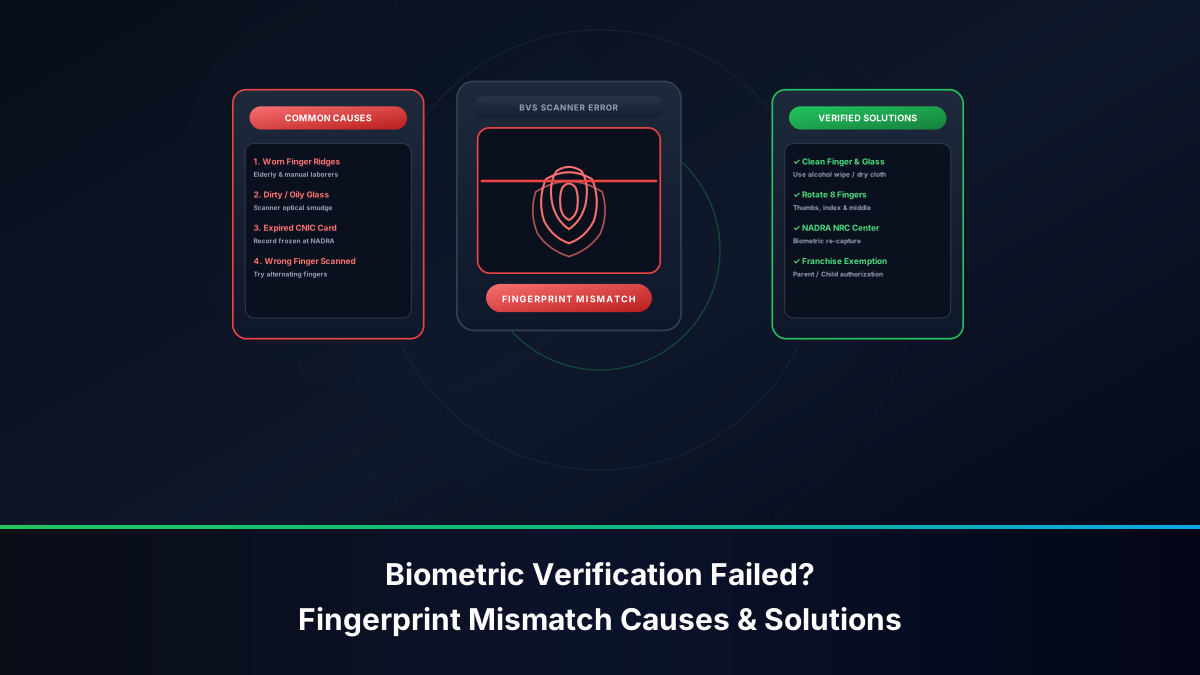
Biometric verification failures stem from three distinct categories: biological conditions of the skin, physical scanner defects, or telecom system network timeouts.
1. Biological and Age-Related Factors
- Epidermal Ridge Degradation (Age 55+): As human skin ages, it loses collagen, elasticity, and sub-dermal moisture. In senior citizens, the friction ridges on the fingertips naturally flatten, thin out, and fragment. When pressed against flat glass scanners, these degraded ridges collapse into an unrecognizable smudge.
- Manual Labor and Abrasive Wear: Construction workers, agricultural farmers, factory machinists, mechanics, and stonecutters subject their hands to intense physical abrasion. Continuous friction wears away the outermost stratum corneum layer of the epidermis, temporarily eliminating fingerprint definition.
- Chemical and Detergent Exposure: Domestic workers, cleaners, laboratory staff, and textile dye workers frequently handle harsh chemicals, dishwashing detergents, bleach, and calcium oxide (lime/choona). These substances cause chemical peeling, micro-blisters, and severe ridge distortion.
- Dermatological Conditions: Eczema, psoriasis, hyperhidrosis (excessive palm sweating), and fungal dermatitis cause irregular skin shedding that prevents optical sensors from capturing consistent minutiae points.
2. Environmental & Device Conditions
- Excessive Skin Dryness (Winter Months): Optical scanners rely on light reflection boundaries created by natural dermal moisture and air gaps between ridges. Bone-dry skin reflects light uniformly, producing a washed-out, invisible scan.
- Dirty, Scratched Scanner Glass: Retail scanners in dusty street shops frequently accumulate layers of grease, sweat, dust, and microscopic scratches. This background noise corrupts the image capture, dropping the image quality score below acceptable API thresholds.
- Improper Pressure: Pressing down too aggressively on the scanner glass flattens the valleys between ridges, turning the print into a solid black blotch. Conversely, resting the finger too lightly leaves gaps that the algorithm interprets as broken ridges.
3. Systemic and Telecom Network Glitches
- NADRA Gateway Latency: During peak midday business hours or festive seasons, NADRA's API gateway handles tens of thousands of concurrent biometric queries from banks, telecom operators, and property registries simultaneously. Packet drops can manifest as automated timeout failures.
- Stale Reference Templates: If your CNIC was issued 10 to 15 years ago, NADRA's database holds low-resolution 500 DPI legacy biometric templates captured on older hardware. Comparing a modern high-resolution 1000 DPI live scan against a compressed decade-old template often triggers false rejection errors.
Practical Retail-Counter Hacks: Preparing Hands for Optical & Capacitive Scanners
Before giving up or traveling to a distant NADRA office, try these field-tested, practical adjustments directly at the retailer's counter. In over 60% of temporary mismatch cases, these simple techniques raise the algorithmic score above the required threshold:
The Five-Step Counter Protocol
- 1Clean the Scanner Glass: Politely ask the shopkeeper to wipe the scanner glass with a dry microfiber cloth or lens tissue. Residual grease from previous customers is a primary culprit behind low-quality scores.
- 2Rehydrate the Skin: If your hands are dry, apply a dime-sized drop of moisturizing lotion, petroleum jelly (Vaseline), or glycerin. Rub it thoroughly into your fingertip pads and wait 60 seconds for absorption. If lotion is unavailable, lightly rubbing your fingertip against the side of your nose or forehead transfers a microscopic trace of natural sebum oil, which dramatically improves ridge reflection.
- 3Dry Sweaty Palms: If your palms are moist or sweaty, moisture floods the valleys between ridges. Wash your hands with mild soap, dry them thoroughly with paper towels, and allow the skin to cool before touching the sensor.
- 4Calibrate Applied Pressure: Do not squash your finger onto the sensor. Place the center of your fingerprint whorl gently and evenly onto the illuminated glass, keeping your finger completely motionless for 3 full seconds until the green capture light flashes.
- 5Cycle Through All Enrolled Fingers: Many subscribers mistakenly believe they can only use their right thumb. NADRA records templates for all ten fingers. Ask the agent to switch the terminal prompt to your Left Index, Right Index, Left Thumb, or Little Finger. Secondary fingers often have significantly less physical wear than dominant thumbs.
Senior Citizens & Laborers: NADRA's 60+ Biometric Exemption Protocol
Recognizing that biological aging causes unavoidable fingerprint degradation, the PTA, in consultation with the Ministry of Information Technology and Telecommunication (MoITT) and NADRA, established a formal Senior Citizen Assisted Verification Policy.
If a citizen aged 60 years or older experiences persistent biometric mismatches, they are entitled to alternative identity authentication under the following regulatory framework:
The Official Franchise Assisted Verification SOP
- Eligibility Criteria: The applicant must be at least 60 years of age according to the date of birth recorded on their Computerized National Identity Card.
- Mandatory Official Channel: This assisted protocol is strictly available at company-owned Customer Care Centers (CSCs) of Jazz, Zong, Telenor, and Ufone. Third-party retailers and roadside kiosks do not possess system privileges to trigger this workflow.
- Two Documented Scan Failures: The customer care representative must attempt biometric verification on at least two different fingers. When the system logs consecutive automated failure codes, the portal unlocks the "Senior Citizen Alternative KYC" module.
- NADRA Security Question Verification: The terminal prompts the representative with dynamic, confidential personal verification questions pulled directly from the citizen's NADRA family tree records, such as:
- Mother's registered full name.
- Place of birth / District of origin.
- Registered siblings or spouse's name.
- Permanent residential address district.
- Facial Verification Integration: At modern Tier-1 customer care centers equipped with digital webcams, the representative captures a live high-definition facial photograph. The photograph is matched against the citizen's NADRA digital portrait using facial recognition algorithms, bypassing fingerprint requirements entirely.
How to Permanently Update Fingerprint Ridges at NADRA Registration Centers
If retail-counter hacks fail and you are under 60 years of age, your underlying reference templates in the national data warehouse are outdated or damaged. Attempting scans at fifty different mobile shops will yield the exact same error. The only permanent, legally sound solution is to undergo a Biometric Data Refresh at a NADRA Registration Center (NRC).
Step-by-Step NADRA Biometric Renewal Procedure
- Step 1: Visit an Executive or Mega NADRA Center: Locate the nearest NADRA Registration Center (preferably an Executive or Mega Center, which feature advanced multi-spectral 10-print slap scanners rather than older single-finger units).
- Step 2: Apply for CNIC Modification / Renewal: Request a token for CNIC Modification or CNIC Renewal (even if your card has not expired, you can request an update due to photographic and biometric updates).
- Step 3: High-Resolution 10-Finger Enrollment: At the data entry counter, the data acquisition operator will capture full-hand rolled and flat impressions of all ten fingers using an FBI-certified, optical live-scan apparatus. Ensure the operator cleans the glass surface before your capture.
- Step 4: Facial Portrait and Signature: A new high-resolution digital facial photograph is recorded alongside your digitized signature.
- Step 5: Database Template Overwrite: Once your application is processed and approved by the verification officer, NADRA's automated system generates a fresh set of high-density minutiae templates, overwriting the old, low-resolution files in the national warehouse.
Propagation Timeline: After receiving your updated Smart National Identity Card (SNIC), wait 24 to 48 hours for the new biometric templates to synchronize across the central telecom verification gateway before attempting your next SIM card activation.
Alternative Digital Verification: NADRA Pak ID Facial Recognition
With the rapid modernization of NADRA's digital identity stack, the traditional dependence on physical fingerprint scanners is undergoing a massive transformation. The flagship innovation driving this shift is the NADRA Pak ID Mobile Application (available on Apple iOS and Google Android).
Pak ID incorporates cutting-edge, contactless biometric technology:
- Contactless Fingerprint Capture: The mobile application utilizes your smartphone's rear camera and LED flashlight to capture four fingers simultaneously without touching any glass sensor. Advanced computer vision algorithms separate the ridges from background shadows and compress the data into standard ANSI/NIST biometric records.
- Liveness-Verified Facial Recognition: For citizens whose fingerprints are completely eroded, Pak ID employs 3D passive liveness facial verification. The user aligns their face within an on-screen oval guide, blinks when prompted, and the system compares the live biometric mesh against the stored identity portrait with near-instantaneous accuracy.
- Integration with Digital SIM Providers: Digital-first mobile operators such as ONIC and digital onboarding portals of traditional telcos are actively transitioning toward Pak ID-integrated app workflows. Subscribers can complete their entire SIM ordering, identity authentication, and eSIM provisioning at home without touching a physical fingerprint scanner.
Decoding Common Carrier BVS Error Codes (Err 101, 102, 404, 500)
When a biometric transaction fails, the operator's terminal displays a specific numeric or alphanumeric error string. Understanding what these codes mean helps identify whether the problem lies with your skin, the scanner, or the telecom network:
| Error Code | System Message | Root Cause | Immediate Resolution |
|---|---|---|---|
| BVS-101 | Fingerprint Mismatch | Algorithmic confidence score below 70% threshold | Moisturize skin; test opposite index finger or thumb. |
| BVS-102 | Image Quality Insufficient | Scanner glass dirty or finger moved during exposure | Clean sensor glass; hold finger completely still for 3s. |
| BVS-205 | CNIC Expired / Blocked | Identity card has crossed validity date in NADRA database | Renew CNIC at NADRA center before purchasing SIM. |
| BVS-302 | Quota Exceeded (5 SIM Cap) | CNIC already holds 5 active voice SIMs across networks | Surrender an existing unused SIM before adding a new line. |
| BVS-500 / 504 | Gateway Timeout | NADRA or carrier backend connection dropped during query | Network congestion. Wait 15 minutes and retry transaction. |
Official Escalation Pathways: Franchise Inquiries, PTA CMS, & Ombudsman
If you have updated your fingerprints at NADRA, verified that your CNIC is fully active, and yet retail operators continue to experience persistent biometric rejections that prevent you from exercising your basic right to cellular connectivity, formal administrative remedies are available under Pakistani law:
1. Lodge an Official Complaint with the PTA CMS
The Pakistan Telecommunication Authority operates an independent Consumer Complaint Management System designed to resolve carrier-level verification deadlocks:
- Visit cms.pta.gov.pk or download the PTA CMS App.
- Select Register Complaint > Service Disruption / Biometric Verification Issue.
- Upload your CNIC copy, details of the customer care franchise visited, and a description of the repeated BVS failures.
- PTA regulatory officers will issue a formal directive to the designated telecom operator's regulatory affairs department to arrange an assisted verification session under supervisor oversight.
2. Redressal via the Federal Wafaqi Mohtasib (Ombudsman)
If NADRA centers repeatedly refuse to update your biometrics or fail to resolve identity mismatch issues for vulnerable citizens, an administrative complaint can be filed before the Wafaqi Mohtasib (Federal Ombudsman) or the Federal Insurance / Banking Mohtasib. The Ombudsman holds statutory powers to order NADRA to issue biometric waiver certificates or execute custom home-visit enrollments for bedridden and paralyzed individuals.
Troubleshooting Matrix: Error Type, Biological Cause & Guaranteed Fix
Use this diagnostic reference matrix to quickly identify the correct course of action based on your specific situation:
| User Category | Underlying Issue | Counter Remedy | Permanent Regulatory Remedy |
|---|---|---|---|
| Senior Citizens (60+) | Natural ridge flattening & thinning | Apply heavy moisturizer; try pinky finger | Official franchise Senior Citizen Assisted KYC / Facial bypass |
| Laborers & Farmers | Abrasive ridge wear & chemical peeling | Soak hands in warm water + glycerin; rest 2 days | Re-enroll all 10 fingers at NADRA Mega Center |
| Young Adults / Office Workers | Excessive dryness or cold hands | Rub nose/forehead for sebum; gentle scanner pressure | Check CNIC expiry date; wait out peak gateway hours |
| Individuals with Disabilities | Permanent limb impairment / amputation | None (retail cannot process) | NADRA Special Disabled CNIC + Medical Board Waiver Protocol |
Frequently Asked Questions About Biometric Verification Failures
Below are authoritative answers to common troubleshooting queries regarding NADRA BVS errors across Pakistani mobile networks.
Can I send someone else to buy a SIM card on my behalf using my CNIC?
No, absolutely not. Under PTA regulations, third-party proxy SIM purchases are strictly prohibited. The physical individual whose CNIC is being registered must be physically present at the customer care counter to submit their own live biological fingerprints. Handing your CNIC to a relative or friend will result in an instant verification failure at the biometric stage and may lead to fraud flagging.
Why does my fingerprint work at an ATM or bank but fail at a SIM retailer?
Different industries configure their biometric matching algorithms with varying sensitivity and tolerance thresholds. State Bank of Pakistan (SBP) regulations for branch banking and 1Link biometric ATMs often utilize multi-sample averaging or secondary PIN verification fallbacks. In contrast, PTA cellular verification enforces an exceptionally stringent one-to-one minutiae match threshold to prevent identity spoofing and counterfeit silicone finger moulds, leading to a higher rejection rate on marginal skin ridges.
How long should I wait after updating my biometrics at NADRA before buying a SIM?
Although NADRA updates its internal records immediately upon card production, synchronization across external telecom operator APIs and cached subscriber databases can take between 24 and 48 hours. It is strongly recommended to wait until you have physically received your new Smart CNIC and allowed at least 2 full business days before visiting a telecom franchise for your SIM activation or transfer.
By understanding the precise biological and technical mechanisms behind NADRA's Biometric Verification System, applying practical skin preparation techniques, taking advantage of senior-citizen statutory exemptions, and utilizing permanent NADRA re-enrollment channels, Pakistani subscribers can decisively overcome fingerprint mismatch barriers and ensure uninterrupted access to their digital lives.