Understanding USSD Technology: How Signaling Channels Power Instant Telecom Menus
In Pakistan's mobile telecommunications landscape, Unstructured Supplementary Service Data (USSD) represents one of the most resilient, pervasive, and instantaneous communication mechanisms ever deployed. While modern smartphone users increasingly manage connectivity through mobile applications like Jazz World, My Zong, My Telenor, and My Ufone, USSD remains the universal backbone of mobile utility. Unlike internet-dependent OTT services or store-and-forward SMS architectures, USSD communicates directly over cellular signaling channels—specifically the Fast Associated Control Channel (FACCH) and Stand-alone Dedicated Control Channel (SDCCH) over GSM, UMTS, LTE, and 5G signaling radio bearers.
When you dial a code beginning with an asterisk (*) and terminating with a hash symbol (#), your cellular handset does not initiate a voice call or package a data packet. Instead, it generates a real-time session with the Mobile Switching Center (MSC) and Home Location Register (HLR) utilizing Signaling System No. 7 (SS7) / MAP protocols. Because USSD establishes an active, session-oriented connection with near-zero latency, it operates on basic 2G feature phones without an internet connection, consumes negligible network overhead, and leaves no residual message footprint in the subscriber's SMS inbox. For verifying SIM registration identity, auditing account balances, activating emergency airtime advances, or checking IMEI compliance, USSD codes are the fastest diagnostic tool available to Pakistani citizens.
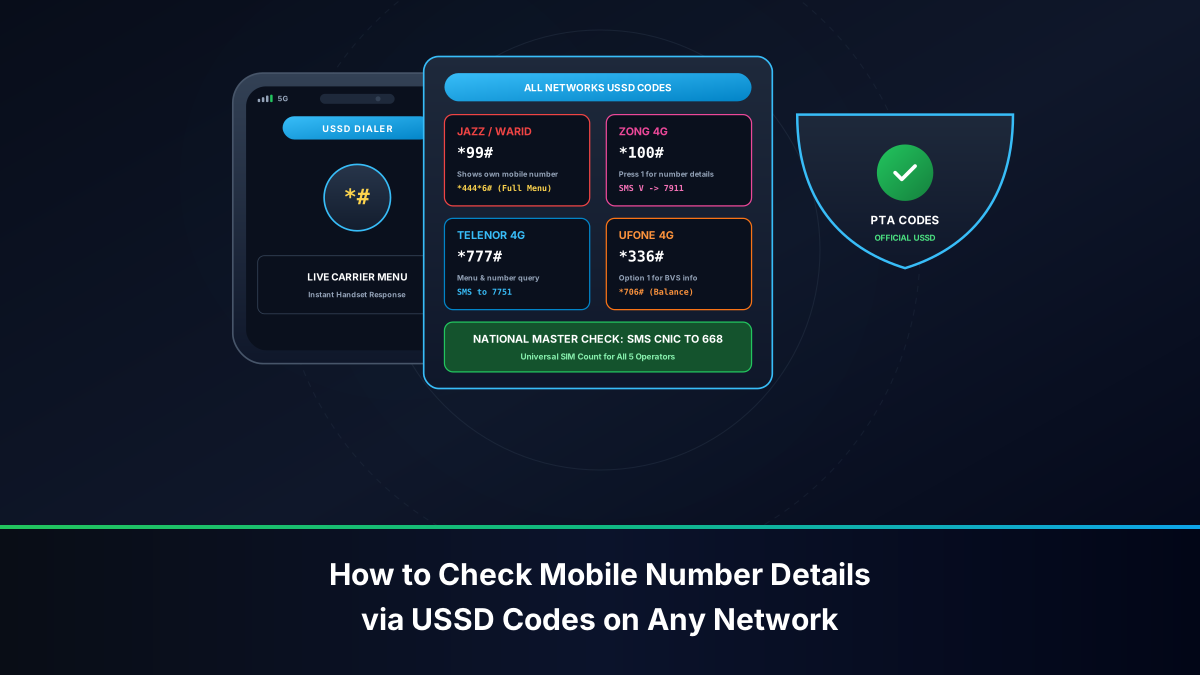
Master Comparative Table: Essential USSD Codes Across All Pakistani Operators
This master reference table synthesizes the most frequently utilized operational USSD codes across all licensed cellular networks in Pakistan: Jazz / Warid (PMCL), Zong 4G (CMPak), Telenor Pakistan, and Ufone 4G (PTCL).
| Core Telecom Function | Jazz / Warid (PMCL) | Zong 4G (CMPak) | Telenor Pakistan | Ufone 4G (PTCL) |
|---|---|---|---|---|
| Check Own Mobile Number (MSISDN) | *99# |
*8# or *100# |
*888# (or SMS to 7751) |
*706# or *336# |
| Check SIM Owner Name & CNIC | *1111# |
*310# > 1 (or SMS V to 7911) |
*777# (or SMS to 7751) |
*336# > Option 1 |
| Main Prepaid Balance Inquiry | *111# |
*222# |
*444# |
*124# |
| Remaining Data / MBs Inquiry | *117*4*2# |
*102# |
*999# |
*706# |
| Remaining Minutes & SMS Inquiry | *110# |
*102# |
*222# |
*707# |
| Emergency Airtime Loan (Advance) | *112# |
*911# |
*0# |
*456# |
| Balance Share / Smart Transfer | *100*9230X*Amount# |
*828*9231X*Amount# |
*1*1*9234X*Amount# |
*828*9233X*Amount# |
| Master Menu / Main Self-Care | *444# (Super Duper) |
*310# |
*345# |
*336# |
| Mobile Financial Wallet Portal | *786# (JazzCash) |
*786# (PayMax) |
*786# (Easypaisa) |
*786# (UPaisa) |
| Customer Care Helpline | Dial 111 |
Dial 310 |
Dial 345 |
Dial 333 |
SIM Ownership, Registered CNIC & Number Inquiry Codes by Network
Inadvertently misplacing an active phone number or operating a connection without knowing its exact legal registration is a serious regulatory hazard under PTA rules. To immediately retrieve your phone number and verify ownership metadata without visiting a retail franchise, follow network-specific instructions below:
1. Jazz & Warid: *1111# and *99#
- Checking Your Mobile Number: Open your dialer, enter
*99#, and press Call. Within 1 to 2 seconds, an interactive network popup will display your exact 11-digit MSISDN (e.g.,03001234567or03211234567). This service is 100% free of charge and requires zero airtime balance. - Checking Registered Owner & CNIC: Dial
*1111#from your Jazz or Warid SIM. The network responds with the registered subscriber's full legal name, masked CNIC number (showing division digits and gender checksum), and active tariff plan.
2. Zong 4G (CMPak): *8# and *310#
- Checking Your Mobile Number: Dial
*8#on your dialer keypad. Zong's HSS node flashes an on-screen dialog: "Your MSISDN is 9231XXXXXXXX". Alternatively, dial*100#and follow the menu prompt. - Checking Registered Owner & CNIC: Dial
*310#to access the CMPak self-care portal. Navigate to Account Information > SIM Details to view your registered profile. For an SMS record, sendVto shortcode7911.
3. Telenor Pakistan: *888# and 7751
- Checking Your Mobile Number: Dial
*888#on your dialer keypad, or dispatch a blank SMS (or typeMNP) to shortcode7751. Telenor's server responds with your complete mobile number and IMSI mapping. - Checking Registered Owner & CNIC: Dial
*777#from your Telenor connection to inspect your customer profile, or check your account header in the My Telenor app.
4. Ufone 4G (PTCL): *706# and *336#
- Checking Your Mobile Number: Dial
*706#or dial*336#and select Option 1 ("SIM Details"). The screen renders your 11-digit MSISDN along with active resource summaries. - Checking Registered Owner & CNIC: Dial
*336#, input Option 1, and review the registered subscriber name and CNIC association returned by PTCL's billing gateway.
Jazz & Warid (PMCL): Comprehensive USSD Code Reference & Menu Navigation
Following the merger of Mobilink and Warid, PMCL unified all subscriber commands into a cohesive USSD architecture:
- Balance Check (
*111#): Incurs approximately PKR 0.24 + tax per inquiry. Returns current rupee balance and validity expiration date. - Super Duper Offers (
*444#): Jazz's proprietary dynamic menu offering personalized daily, weekly, and monthly voice, SMS, and data packages tailored to individual calling habits. - Data Balance (
*117*4*2#): Queries remaining 4G data MBs, breakdown between peak and off-peak hours, and expiration timestamp. - Jazz Advance (
*112#): Grants an instant emergency airtime loan of PKR 30 to PKR 60, automatically deducted with an administrative service charge upon your next recharge. - Call History & Info (
*1111#): Master identity and account status string.
Zong 4G (CMPak): Complete USSD Directory & Self-Care Shortcuts
Zong utilizes a structured USSD portal architecture powered by its Huawei core network:
- Master Portal (
*310#): Zong's flagship interactive portal. Provides direct options for package activation, balance loans, international roaming, caller tunes, and bill payments. - Remaining Resources (
*102#): Zong's unified resource inquiry string. After dialing, select1for Total Summary,2for Remaining Minutes,3for Remaining SMS, or4for Remaining 4G Data MBs. Incurs a nominal PKR 0.12 + tax charge. - Rescue Loan (
*911#): Provides emergency airtime advance for eligible prepaid subscribers with at least 3 months on-network tenure. - Location Based Gaming & Social Bundles (
*6464#): Direct promotional bundle activation engine.
Telenor Pakistan: Master USSD Codes for Account, Data & SIM Status
Telenor Pakistan's USSD engine is optimized for high-speed menu transitions:
- Balance Check (
*444#): Displays main account balance and validity date. - EasyCard & Bundle Menu (
*345#): Master subscriber menu for purchasing EasyCard 800, 1000, or customized weekly hybrid bundles. - Data Status (
*999#): Returns an instant flash notification detailing remaining 4G MBs across social, night, and all-usage data buckets. - Telenor Emergency Loan (
*0#): Provides an immediate PKR 30 balance advance. - Smart Share (
*1*1*9234XXXXXXXX*Amount#): Secure peer-to-peer balance transfer mechanism between Telenor subscribers.
Ufone 4G (PTCL): Interactive USSD Service Menus & Balance Management
Ufone 4G maintains clean, standardized USSD shortcuts integrated directly with PTCL core infrastructure:
- Main Balance Inquiry (
*124#): Returns active prepaid airtime balance. - Ufone Master Menu (
*336#): Interactive self-service portal containing options for Super Card activation, tariff migration, SIM verification, and international roaming. - Remaining Resources (
*706#): Free USSD summary displaying unconsumed minutes, SMS, and data volume across active bundles. - Ufone Advance (
*456#): Loans emergency airtime to prepaid subscribers when balance drops below PKR 11. - U-Share (
*828*9233XXXXXXXX*Amount#): Facilitates instant airtime transfer between Ufone customers nationwide.
National Regulatory & Inter-Carrier Shortcodes: PTA 668, DIRBS 8484 & MNP 667
In addition to operator-specific commercial USSD menus, the Pakistan Telecommunication Authority mandates several critical national shortcodes that operate across all telecom networks:
| National Shortcode | Transmission Format | Tariff | Regulatory Function |
|---|---|---|---|
| 668 (PTA Clearinghouse) | SMS 13-digit CNIC to 668 | PKR 2.00 + tax | Returns total count of registered SIMs per operator on your CNIC |
| 8484 (PTA DIRBS) | SMS 15-digit IMEI to 8484 | Free / Nominal | Checks mobile handset legality, customs duty status, and PTA approval |
| 667 (MNP Clearinghouse) | SMS MNP to 667 |
Standard SMS | Retrieves exact registration metadata required for Mobile Number Portability |
| 9100 (Do Not Call Registry) | SMS reg to 9100 |
Free | Registers your number on the PTA anti-telemarketing spam blocking list |
| *786# (Universal Mobile Wallet) | Dial *786# from registered SIM | Free | Accesses JazzCash, Easypaisa, or UPaisa digital financial accounts |
Troubleshooting Handset Errors: 'MMI Code Invalid' and 'Connection Problem'
Subscribers frequently encounter frustrating on-screen errors when dialing USSD strings, such as "Connection problem or invalid MMI code" or "USSD session timed out". These errors stem from specific handset and signaling conflicts:
- SIM Slot Routing on Dual-SIM Devices: If you dial a carrier-specific code (e.g.,
*111#for Jazz) but your dialer automatically routes the call through SIM 2 (e.g., Zong), the receiving carrier's switch does not recognize the string and throws an invalid MMI error. Always configure your dialer to prompt for SIM selection before calling. - Radio Access Network Signal Degradation: USSD operates over low-latency signaling channels. If your phone is connected to an unstable cell tower edge (fluctuating between LTE, 3G, and 2G), the signaling packet drops. Toggle Airplane Mode ON for 10 seconds and OFF to force a clean baseband re-registration.
- Third-Party Dialer Interference: Certain third-party dialer applications (e.g., Truecaller, customized phone dialers) inadvertently encode USSD commas or pauses improperly. Use the phone's stock native dialer application when entering USSD strings.
- LTE VoLTE IMS Conflicts: In rare cases, buggy VoLTE implementations attempt to route USSD over SIP IMS channels that lack supplementary service translation. Temporarily disabling VoLTE in Settings > Mobile Networks > VoLTE Calls forces the handset to route the USSD query over traditional CS (Circuit Switched) signaling, resolving the error immediately.
Technical Deep Dive: MAP Phase 2+ Protocols, VLR Handshakes & Session States
To fully appreciate the operational robustness of USSD across Pakistan's cellular infrastructure, one must examine the signaling exchanges executed across the Core Network. Standard text messages (SMS) operate in a store-and-forward paradigm governed by 3GPP TS 23.040 specifications. When an SMS is sent, it is buffered by a Short Message Service Center (SMSC); if the destination handset is unreachable or powered off, the message waits in queue until a timer expires or delivery succeeds. In contrast, USSD operates under 3GPP TS 22.090 and TS 23.090 standards as a session-oriented, conversational channel established directly between the handset and a USSD Gateway (USSDG).
When you enter a string such as *1111# on your device, the Mobile Station (handset) formats a ProcessUnstructuredSS-Request (PSSR) Mobile Application Part (MAP) signaling message. This message traverses the radio link via the base station to the Visitor Location Register (VLR) and Serving GPRS Support Node (SGSN) or Mobility Management Entity (MME). The VLR intercepts the command, recognizes the service code, and opens a dedicated transaction capability application part (TCAP) dialogue with the Home Location Register (HLR) or an external USSD Gateway connected over an SMPP or XML/HTTP Application Programming Interface.
Because the session is maintained in real time with an active transaction ID, subsequent menu selections (such as pressing '1' or '2' to drill down into sub-menus) do not require renegotiating radio channels. The transaction remains open until either the subscriber executes a termination command, the service application concludes the dialogue with an UnstructuredSS-Notify (USSN) or release message, or an inactivity timer (typically 30 seconds across Jazz, Zong, Telenor, and Ufone switches) triggers an automatic session timeout. This architecture explains why USSD is virtually impervious to internet routing outages, DNS resolution delays, and mobile data bundle exhaustion.
The Digital-First Operator: How ONIC Handles USSD and App-Only Architecture
In recent years, Pakistan witnessed the commercial launch of ONIC, an app-centric digital mobile service operating under Pak Telecom Mobile Limited (PTCL/Ufone's telecom license). ONIC represents a structural paradigm shift in telecom consumption, designed primarily for digital natives who manage all aspects of their connectivity via modern smartphone applications rather than legacy USSD menus:
- Minimalist USSD Reliance: While traditional networks host dozens of nested USSD menus for every micro-bundle, ONIC minimizes legacy strings. Basic regulatory queries (such as checking DIRBS IMEI via
*#06#or cross-referencing PTA clearinghouses) remain functional at the radio layer, but account balances, data allotments, and SIM plan renewals are conducted entirely within the encrypted ONIC mobile app. - eSIM Integration: Because ONIC heavily prioritizes eSIM profiles delivered via digital QR codes, the need for manual SIM card number lookups via USSD strings is largely eliminated. The user's ICCID, registered MSISDN, and NADRA biometric validation record are surfaced directly within the application profile upon activation.
- Shared Network Signaling: Because ONIC leverages Ufone's physical cell tower grid and radio frequency spectrum, fundamental network diagnostic commands (such as testing network attachment or querying emergency call routing) adhere to Ufone's core MAP and SS7 parameters.
Security & Anti-Fraud Best Practices: Guarding USSD Sessions and Mobile Wallets
Because USSD provides frictionless access to personal account data and financial engines (notably the national *786# gateway for JazzCash and Easypaisa), mobile subscribers must adhere to stringent cybersecurity standards:
- Never Share Mobile Financial PINs: Dialing
*786#opens an encrypted USSD session to your branchless bank account. Telecom operators, bank representatives, and PTA officials will NEVER call you asking you to input your secret 4-digit or 5-digit MPIN into a USSD string or forward an OTP. Scammers posing as lottery officials or Benazir Income Support Program (BISP) administrators routinely trick victims into entering balance transfer codes (e.g., dialing*100*9230X*Amount#under the pretext of "receiving a prize"). In telecom USSD architecture, dialing a balance transfer string always sends money—it never receives funds. - Beware of Social Engineering Shortcodes: Fraudsters may instruct you to dial strings like
**21*03XXXXXXXXX#. This is not a prize verification code; it is the universal GSM Unconditional Call Forwarding command. Dialing it diverts all your incoming phone calls to the fraudster's handset, enabling them to hijack your WhatsApp, bank login OTPs, and two-factor authentication tokens. If you suspect your calls have been diverted, dial the universal cancellation string##002#immediately to disable all active call forwards. - Screen Peeking & Public Inquiries: When dialing
*1111#or other identity-revealing strings in public transport or crowded markets, be mindful of shoulder surfing. Although operators mask the central digits of your CNIC, malicious observers can still capture your full legal name, active MSISDN, and primary district code to facilitate targeted social engineering. - Disposal of Inactive SIM Cards: If you discontinue using a SIM card, remember that inactive lines are subject to PTA recycling after 180 days of non-usage. Before discarding an old SIM, dial the carrier's identity USSD code to verify the line status, cancel any linked mobile banking wallets via
*786#, and surrender the connection at a corporate customer service center to ensure your biometric identity remains clean.
Frequently Asked Questions: Cellular USSD Codes in Pakistan
Direct technical answers addressing consumer inquiries regarding USSD string commands, balance inquiries, and regulatory shortcodes across Pakistani networks.