Telenor Pakistan Telecommunications Architecture & Market Role
Since entering the Pakistani telecommunications sector in 2005, Telenor Pakistan (formerly a subsidiary of Norway's Telenor Group, operating across 0340, 0341, 0342, 0343, 0344, 0345, 0346, 0347, 0348, and 0349 series) has been a pioneering force in cellular voice, 4G mobile broadband, and branchless financial services. Serving over 45 million subscribers across urban centers, agricultural heartlands, and remote northern districts, Telenor has established one of the most reliable wireless footprints in Pakistan.
In full alignment with directives enforced by the Pakistan Telecommunication Authority (PTA) and the National Database and Registration Authority (NADRA), all active Telenor prepaid, postpaid, and mobile broadband connections are bound biometrically to a 13-digit Computerized National Identity Card (CNIC). Whether you are verifying ownership of a personal number, auditing a family connection, or resolving biometric re-verification alerts, understanding Telenor's specialized shortcodes and digital self-care channels is critical.
Regulatory Compliance Notice: Under the Pakistan Telecommunication (Re-organization) Act 1996 and the Prevention of Electronic Crimes Act (PECA 2016), the legal owner recorded in NADRA's citizen database is presumed responsible for all electronic traffic originating from that SIM. Regularly audit your registered connections to defend against identity misuse.
The Importance of Verifying Telenor SIM Ownership
Confirming that your Telenor connection is registered in your personal name is essential for multiple everyday digital operations:
- Easypaisa Mobile Wallet Operations: As Pakistan's pioneering branchless banking platform, Easypaisa operates in close synergy with Telenor cellular lines. SBP regulations mandate that an Easypaisa account must match the biometrically registered owner of the SIM. If ownership diverges, financial transfers, ATM card issuance, and international remittances will be blocked.
- Two-Factor Authentication (2FA) for Banking: Automated SMS alerts, banking OTPs, and credit card verifications require uncompromised SIM ownership. An unregistered or third-party SIM exposes your financial accounts to unauthorized SIM-swap takeovers.
- Income Tax Withholding Deduction (Section 236): Active tax filers can reclaim Advance Income Tax deducted on Telenor prepaid recharges and postpaid billings. If the tax deduction certificate reflects another person's CNIC, the FBR Iris portal will reject the tax adjustment.
- Preserving Historical Numbers: Under PTA inactivity guidelines, SIMs without billable activity for 180 consecutive days risk termination and recycling. Auditing your connection ensures your number remains securely mapped to your legal identity.
Method 1: Instant MSISDN & Lifecycle Verification via USSD *7711#
For immediate on-screen access to your subscriber identity profile without incurring SMS charges, Telenor provides the dedicated *7711# customer lifecycle menu:
Navigating the *7711# Self-Service Menu
- Open the phone dialer application on your mobile device.
- Select the Telenor SIM in dual-SIM settings.
- Dial
*7711#and tap Call. - An interactive USSD popup will display on your screen presenting customer service options, including "SIM Information", "Re-verification Status", and "Number Details".
- Follow the numerical prompts to view your active MSISDN and connection standing.
Operational Characteristics: This service functions with PKR 0.00 account balance, requires no internet connection, and works seamlessly across 2G, 3G, and 4G handsets.
Method 2: Querying Owner Details via Dedicated SMS Shortcodes 7751 & 7421
Telenor operates two proprietary SMS verification shortcodes designed to assist subscribers who cannot remember their number or wish to confirm registration credentials.
The 7751 SMS Discovery Protocol
- Open your phone's SMS application.
- Create a new outgoing text message addressed to 7751.
- Type MNP in the message body.
- Dispatch the message.
- Within 10 to 30 seconds, Telenor's automated billing system responds with an SMS detailing your active 11-digit mobile number and subscription standing.
The 7421 Blank SMS Information Service
As an alternative quick-lookup channel:
- Compose a blank SMS (or enter a single space if your smartphone messaging app prohibits blank messages).
- Send the message to shortcode 7421.
- Telenor returns an automated SMS displaying the MSISDN and connection type of the active SIM.
Cost Note: Querying 7751 or 7421 incurs a nominal carrier transmission fee of approximately PKR 1.50 plus applicable tax. Ensure your prepaid account maintains at least PKR 3.00 balance.
Method 3: Exhaustive Legal Profile Audit via SMS 667 (MNP)
To inspect the complete legal identity registered against your Telenor SIM card—including the subscriber's full legal name and national identity number—use the national Mobile Number Portability (MNP) shortcode 667:
- Open your SMS composition window.
- Enter 667 as the recipient shortcode.
- Type MNP in capital letters in the text field.
- Send the message from your Telenor connection.
Within seconds, an official automated text arrives from 667 formatted as follows:
Subscriber Name: TARIQ MAHMOOD
CNIC: 35201XXXXXXXX
IMSI: 41006XXXXXXXXXX
SIM Connection Date: 18-AUG-2019
Connection Type: PREPAID
Diagnostic Value: This response provides definitive proof of ownership. If the name or CNIC reflects an unfamiliar individual, you must immediately visit a Telenor Customer Service Center to regularize ownership.
Method 4: Account Profile & Balance Audit via My Telenor App
The official My Telenor application (available on Google Play Store, iOS App Store, and Huawei AppGallery) offers the most intuitive self-care interface for smartphone users.
Profile Information Displayed in My Telenor
- Seamless Cellular Login: When connected over Telenor 4G mobile data, the app detects your SIM and logs in automatically. If using Wi-Fi, enter your phone number to receive a secure SMS OTP.
- Account Profile Inspection: Tap on the profile icon in the side menu. The dashboard displays the registered subscriber name, active tariff plan (such as Telenor EasyCard, Djuice, or Smart Share), remaining data bundles, and loan balances.
- Call History & CDR Logs: My Telenor includes a "History" section detailing the last 7 days of outgoing calls, SMS dispatches, and mobile data usage with exact timestamps and charges.
Downloading FBR Withholding Tax Certificates
Active tax filers can download an official tax deduction statement directly from the app:
- Open My Telenor and navigate to More > History > Tax Certificate.
- Select the desired fiscal year (e.g., July 1, 2024 to June 30, 2025).
- Tap "Download". The app generates a digitally certified PDF showing total withholding taxes deducted under Section 236 of the Income Tax Ordinance.
Easypaisa Branchless Banking: Mandatory Biometric SIM-CNIC Linkage
With over 35 million active users, Easypaisa is Pakistan's leading mobile financial platform. Regulated by the State Bank of Pakistan, Easypaisa operates with strict biometric SIM binding:
- SIM-CNIC Identity Match: An Easypaisa mobile account cannot be registered on a Telenor SIM that belongs to another individual. The core banking engine cross-references the CNIC on the mobile wallet with the telecom HLR registry.
- Biometric Level-Up Authentication: Upgrading wallet monthly limits from PKR 50,000 to PKR 500,000 requires in-person biometric thumbprint scanning at an authorized Easypaisa retailer or Telenor franchise. A mismatch between SIM ownership and citizen ID results in immediate rejection.
- Account Safety in Lost Phone Incidents: If your phone is lost or stolen, calling Telenor helpline 345 to suspend your SIM simultaneously prevents scammers from accessing your Easypaisa funds via SMS OTP interception.
Method 5: In-Person Biometric Auditing at Telenor Customer Service Centers
If your national 668 audit indicates that your CNIC harbors extra Telenor SIM cards that you do not personally own, execute a formal in-person audit:
- Proceed to a Customer Service Center: Visit a direct, company-operated Telenor Customer Service Center or flagship franchise. Avoid third-party neighborhood mobile shops.
- Present Original Smart CNIC: Hand your original physical identity card to the customer care officer. Laminated photocopies or digital phone pictures are non-compliant under PTA directives.
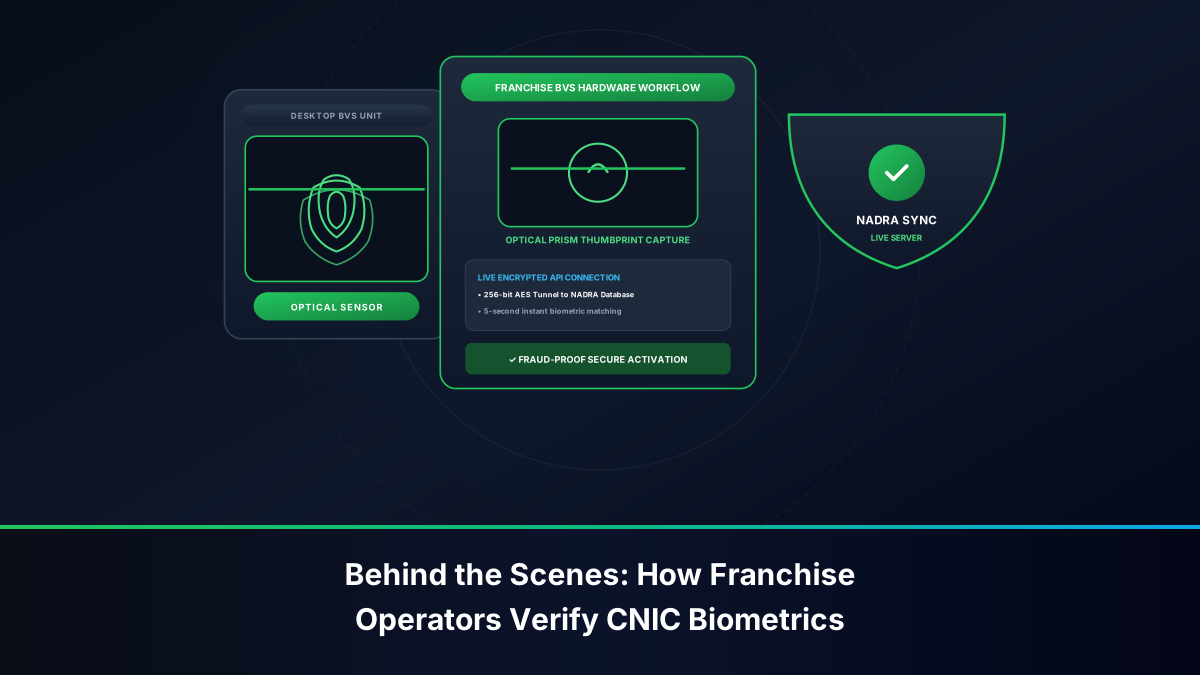
- Live BVS Biometric Verification: Place your thumb or index finger upon the NADRA-connected BVS optical terminal to verify your identity.
- Request Complete MSISDN Statement: Demand an official printed statement displaying every active 11-digit Telenor number registered against your CNIC.
- Biometric SIM Disowning: If any listed number is unfamiliar, immediately request a Biometric SIM Disowning transaction. Fill out the official cancellation form and obtain a signed, stamped receipt.
Formal Biometric SIM Ownership Transfer Procedure
If you are using a Telenor SIM currently registered in a family member's name and wish to transfer legal title to yourself:
- Both the current registered owner and the intended new owner must visit an authorized Telenor Customer Service Center in person.
- Both individuals must present their original physical CNICs.
- The current owner scans their thumbprint on the BVS terminal to authorize the release of the MSISDN.
- The new owner scans their thumbprint on the BVS terminal to accept the connection and bind it to their CNIC.
- The transfer takes effect immediately, and an automated confirmation SMS is delivered to the handset.
Emergency Protocol: Suspending Lost or Stolen Telenor SIMs (345)
If your handset containing an active Telenor SIM is lost or stolen, protect your identity and financial wallets immediately:
- Call Telenor Helpline: Dial 345 from another Telenor connection, or 042-111-345-100 from any other network or landline.
- Verify Security Information: State that your phone has been stolen. Provide your full name, registered CNIC number, mother's maiden name, and last recharge amount.
- Demand Total Call Barring: Request an immediate block on all outgoing calls, incoming calls, SMS, and data traffic.
- Acquire Duplicate SIM: Visit any Telenor franchise with your original CNIC to obtain a replacement physical SIM card. The new SIM instantly and permanently disables the stolen chip.
Troubleshooting Common Telenor Verification Errors & USSD Codes
Subscribers occasionally face technical hurdles when executing self-service requests. Below are verified solutions:
- Error: *7711# Produces "Connection Error or Invalid MMI Code": This error typically stems from weak 2G signaling or dual-SIM slot misdirection. Toggle Airplane Mode for 10 seconds, confirm Telenor is selected as the primary calling SIM, and re-dial.
- Error: SMS to 7751 or 7421 Does Not Deliver: Verify that your prepaid balance is at least PKR 3.00. Check your SMS center number (Telenor SMSC:
+923455000010). - My Telenor App Shows "Something Went Wrong": Clear the app cache in your phone settings, disable any active VPN or ad-blocking software, and ensure you are using the latest version from the app store.
Telenor Core Signaling and Database Infrastructure
To grasp the technical integrity of Telenor Pakistan's identity verification pathways, one must understand how subscriber credentials navigate through Telenor's core GSM, UMTS, and LTE telecommunications signaling network. Telenor's system architecture relies on tightly coordinated nodes:
- Home Location Register (HLR) & Home Subscriber Server (HSS): Operating across carrier-grade server clusters in Islamabad, Lahore, and Karachi, Telenor's HLR/HSS maintains the permanent profile of each SIM. The database maps the physical chip's IMSI (starting with MCC-MNC 410-06) to the public MSISDN. When dialing
*7711#, an unstructured supplementary service data request is transported over SS7 signaling channels directly to the HLR/VLR, which immediately returns the assigned MSISDN without triggering billable voice channels. - Authentication Centre (AuC) & Encryption Handshake: The AuC contains the unique cryptographic key (Ki) burnt into the physical UICC card. Whenever a Telenor SIM attaches to a cellular tower, the AuC verifies the network authentication challenge. Biometric binding through NADRA ensures that this cryptographic pairing can only be established when the citizen's live fingerprint matches state identity records.
- Short Message Service Centre (SMSC) Mediation Engine: When you send 'MNP' to 7751 or compose a message to 7421, the packet hits the Telenor SMSC. The platform decrypts the sender's IMSI, validates account status against the real-time billing engine, and generates a formatted response containing the registered cellular parameters.
State Bank of Pakistan (SBP) Compliance: Easypaisa & Raast Integration
Telenor Pakistan's historical integration with Tameer Microfinance Bank (which evolved into Easypaisa) created the archetype for mobile financial services in Pakistan. Because of this deep integration, verifying SIM ownership on Telenor lines carries profound legal and financial ramifications under SBP regulations:
- Branchless Banking Regulations (BBR) Compliance: SBP mandates that mobile wallets cannot operate anonymously. An Easypaisa account opened on an MSISDN must strictly match the CNIC of the biometrically verified owner of the SIM card. If an audit detects that a SIM has changed ownership while an active wallet remains under the previous subscriber's CNIC, the wallet is immediately frozen to prevent financial fraud.
- Raast National Payment Gateway: Raast enables instant, free interbank transfers by using the subscriber's mobile number as their primary digital alias. If your Telenor number is registered under another person's CNIC, you cannot register that number as your personal Raast ID with major commercial banks like HBL, Meezan, or Bank Alfalah. Ensuring your Telenor SIM is verified under your own CNIC guarantees seamless integration across the entire Pakistani banking ecosystem.
Comprehensive Comparison of Telenor Verification Channels
The following table summarizes all authorized Telenor verification channels:
| Verification Channel | Information Retrieved | Cost | Internet Needed? | Device Compatibility | Speed |
|---|---|---|---|---|---|
| *7711# USSD | Number, Lifecycle Status | PKR 0.00 (Free) | No | All Handsets (2G/3G/4G) | 1 to 3 Seconds |
| SMS to 7751 ('MNP') | Active 11-Digit MSISDN | ~PKR 1.50 + tax | No | All Handsets | 10 to 30 Seconds |
| Blank SMS to 7421 | Number & Subscription Type | ~PKR 1.50 + tax | No | All Handsets | 10 to 30 Seconds |
| SMS 667 ('MNP') | Registered Name, CNIC, IMSI | Standard SMS rate | No | All Handsets | 15 to 45 Seconds |
| My Telenor App | Full Profile, Tax, Usage CDRs | Free (uses data) | Yes | Android / iOS Smartphones | Instantaneous |
| Customer Care (345) | Account Standing & Emergency Bar | Standard call tariff | No | All Handsets | 2 to 5 Minutes |
| Franchise BVS Desk | Complete CNIC Numbers Printout | 100% Free | N/A | In-Person Attendance | 5 to 10 Minutes |